Business Card Box for 85 × 55 mm Cards Template
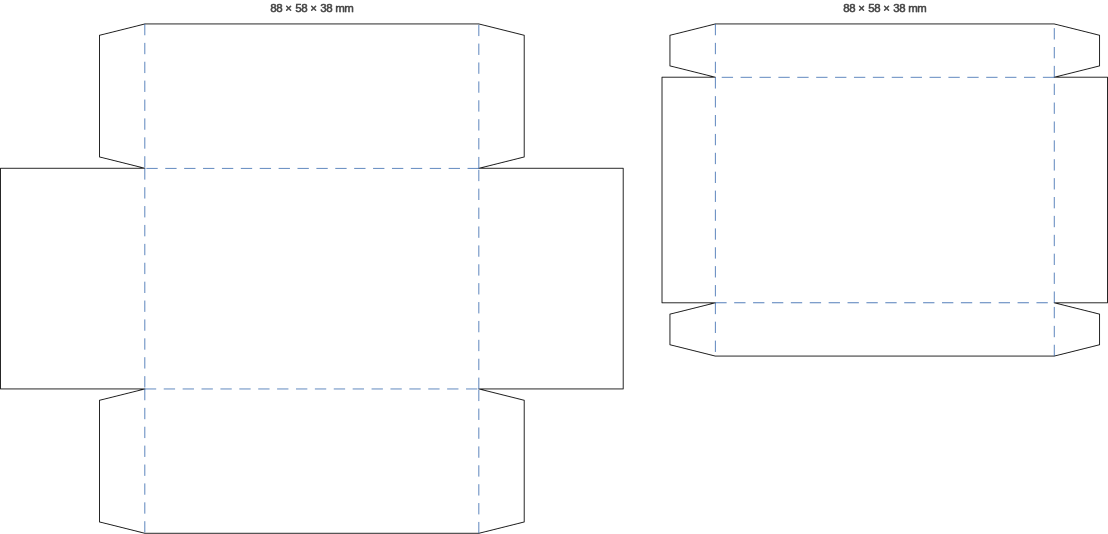
A base and lid for about 100 business cards in the common European size of 85 × 55 mm.
About this template
- Box style
- Two-piece box with lid
- Inside size
- 88 × 58 × 38 mm (3.465 × 2.283 × 1.496 in)
- Material
- Heavy cardstock, 0.4 mm
- Flat size
- Base: 165.1 × 141.2 mm (6.499 × 5.56 in) and Lid: 118.2 × 94.3 mm (4.652 × 3.713 in)
- Sheets of US Letter
- 1
- Sheets of A4
- 1
The sizes on this page suit typical items. Measure yours before you cut, and change the size if needed.
Template
Opens the generator with these measurements, so you can adjust them or the material.
Print at 100% or Actual size. Turn off Fit to page, or the box will come out smaller.
Will it fit on my paper?
Smallest paper that holds the whole template: US Letter.
| Paper | Result |
|---|---|
| US Letter | Fits on one sheet |
| US Legal | Fits on one sheet |
| Tabloid (11 × 17 in) | Fits on one sheet |
| A4 | Fits on one sheet |
| A3 | Fits on one sheet |
| 12 × 12 in cutting mat | Fits on one sheet |
How to put it together
- Cut out both parts, the base and the lid, and score the dashed lines.
- On the base, fold up the four walls and glue the corner tabs to the outside of the neighboring walls.
- Make the lid in the same way.
- Put the lid on the base. It is slightly larger on purpose so it slides on without forcing.
Other box with lid sizes
Common questions
What paper do I need for the Business Card Box for 85 × 55 mm Cards template?
It fits on one sheet of US Letter, US Legal, Tabloid (11 × 17 in), A4, A3, and 12 × 12 in cutting mat. Print it at 100% (Actual size) on cardstock or on the paper you want to use.
How big is the Business Card Box for 85 × 55 mm Cards template when flat?
Laid flat, the template measures Base: 165.1 × 141.2 mm (6.499 × 5.56 in) and Lid: 118.2 × 94.3 mm (4.652 × 3.713 in). That includes the glue and tuck flaps but no bleed.
Can I make this box in a different size?
Yes. Choose Change the size to open the box with lid generator with these measurements filled in, then adjust any of them. The template is recalculated for the material you choose.